

The cloud portal: missions, lifecycle and approvals
🟡 Partial — The portal described is the one running today on platformpre (org NovaCredit), walked live end-to-end. The 8-state lifecycle, the missions, the two onboarding paths and the approval flow with a git record are all built. The portal reads the signed appetite verdict (overall_residual.evaluation) and ENFORCES it: if the aggregate residual exceeds appetite, approving requires a conscious acceptance (an override with a reason). The engine is the authority; the portal projects and enforces it. Human oversight (HOTL) and dual conformance are detailed in [git closes the loop](/en/metodologia/git-cierra-el-bucle/).
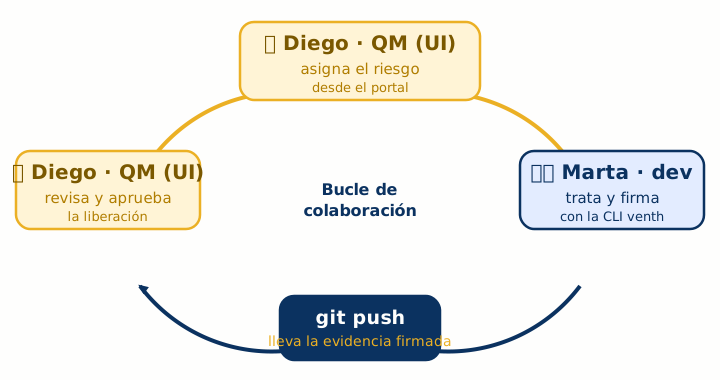
The Level 1 walkthrough goes through the loop end-to-end; this guide looks at it from James’s side, in detail. The portal is not a passive viewer: it’s where the Quality Manager declares, classifies, tracks state, reviews the evidence and approves the market placement. The split holds: James drives the portal and approves; Martha provides and signs the evidence from the CLI and git. We maximize both —every portal mission waits for evidence Martha pushes, and every James approval leaves a commit that Martha sees in her repo.
1. The portal at a glance
Section titled “1. The portal at a glance”When James enters NovaCredit’s portal he lands on the organization dashboard (/[org]): an activation checklist of five steps (install froga · connect a repo · register the signer’s key · create or explore a system · generate the bundle), the governed systems count and the current plan. It’s the “welcome home” that orients whoever just signed the organization up.
From there, James’s work lives in two places: the systems catalog (/[org]/systems) and, inside each system, its detail (/[org]/systems/[slug]). The catalog is the portfolio view; the detail is where you drive a concrete system through its lifecycle.
The piece that stitches the whole portal together is the mission system: at any moment, the portal derives from the system’s state the next actionable step and shows it as a card. James doesn’t have to keep the ISO 23894 / EU AI Act process in his head: the portal tells him what’s next.
2. The mission system: state proposes the action
Section titled “2. The mission system: state proposes the action”A mission is an actionable task the portal derives from the system’s state —not a fixed hand-written list—. The rule is: each lifecycle state has its mission (or missions), and the portal only shows the one that’s truly next.
The mission catalog, in plain language (the declared ones go in order, the rest belong to the matching state):
| State | Mission(s) | What it asks |
|---|---|---|
| Undeclared | Declare the system (froga.yaml) | No manifest yet; the dev must commit it |
| Declared | Declare standards → Classify (Annex III) → Identify risks (ISO 23894 §6.4) → Justify the data gap | Four sequenced sub-steps |
| Assured | Waiting for evidence from the dev team | Martha must train and push the bundle |
| Tested (red gate) | Plan treatment of the risk | Residual exceeds appetite; treat it |
Tested (green gate, owner) | Review and approve the system | James is the authority: approves directly |
Tested (green gate, maintainer) | Request approval | Martha requests; doesn’t approve |
| Treated | Waiting for evidence from the dev team | Plan exists; Martha re-trains and pushes V2 |
| Approved | Download Annex IV · Download Declaration (DoC) | Universal deliverables (+ DORA RoI if it applies) |
| Marketable | (no missions) | Cycle closed |
The order of the four Declared sub-missions is not cosmetic: it’s a regulatory dependency. You can’t classify the system as Annex III §X without first declaring which regulatory frameworks apply; you can’t identify significant risks without knowing which high-risk category it belongs to; and the protected-variables catalog (the data gap) is scoped by the already-identified risks. So the portal shows the next actionable sub-step and leaves the later ones locked with a tooltip until their prerequisite is done.
Identifying risks is not only enumerating model failures. EU AI Act Art. 9(2)(b) and ISO/IEC 42001 §6.1.4 also require analysing reasonably foreseeable misuse: scenarios in which the system is used differently from its intended purpose and can lead to harm. In froga.yaml, this lives in system.potential_misuses (id, description, addressed_by), where addressed_by links the risks that address it. A misuse with no risk covering it is an identification gap (§6.1.4) that the assurance programme has not closed. The froga impact command crosses that list against the risk register and flags unaddressed misuses (advisory).
flowchart LR
  s1["Declare<br/>standards"] --> s2["Classify<br/>(Annex III)"]
  s2 --> s3["Identify risks<br/>(ISO 23894 §6.4)"]
  s3 --> s4["Justify the<br/>data gap"]
There are also two normative missions the portal emits when there are modeled risks: “Complete treatment of risk X” (a declared risk with no treatment, linking to its card) and “Aggregate residual risk exceeds appetite” (if coherence detects it). These derive from the projection of the bundle: the cloud doesn’t recompute the risk, it only surfaces it.
“The system is in ‘Assured’ and the mission says ‘Waiting for evidence from the dev team’, with no button. As the one driving the portal, is this a dead end or a signal that the ball is in someone else’s court?”
“The second, on purpose. Some states are advanced by the engine on evidence, not by the portal on a human trailer: assured and treated are two of them. The action-less mission is informational —it tells you what’s being waited on— while I train and run froga run + git push. As soon as the signed bundle reaches the repo, the cloud recomputes the state to ‘Tested’ and your mission flips by itself to ‘Review and approve’ (if the gate is green) or ‘Plan treatment’ (if it’s red). Nothing conceptual to refresh: state is derived from the git log.”
3. The two onboarding paths: create vs explore
Section titled “3. The two onboarding paths: create vs explore”There are two ways to get a system into the portal, and choosing the right one avoids the most common mistake in the workshop.
- “Create system” (
/[org]/systems/new). The cloud creates a new repository on your provider, seeds an initialfroga.yaml(intended purpose and foreseeable misuse) and registers the system. It asks for: Name, Intended purpose, Organization (optional), Misuses (optional), Connection, and whether the repo is private. It’s for starting from scratch. - “Explore an existing system” (
/[org]/systems/explore). You tie a repository that already exposes.froga/artifacts (from any provider). The cloud reads it to validate access before registering it; it writes nothing. It asks for: Name, Connection, Repository (owner/repository), Reference (branch or tag, optional) and Path (subfolder, optional). It’s for bringing in work that already exists —tying a repo Martha had already pushed with her signed evidence—.
Both paths end the same way: a system in the catalog, with its connection, ready for the lifecycle to drive it. The difference is who puts the froga.yaml: the cloud (create) or Martha, earlier, from her repo (explore).
4. The catalog: the portfolio of systems
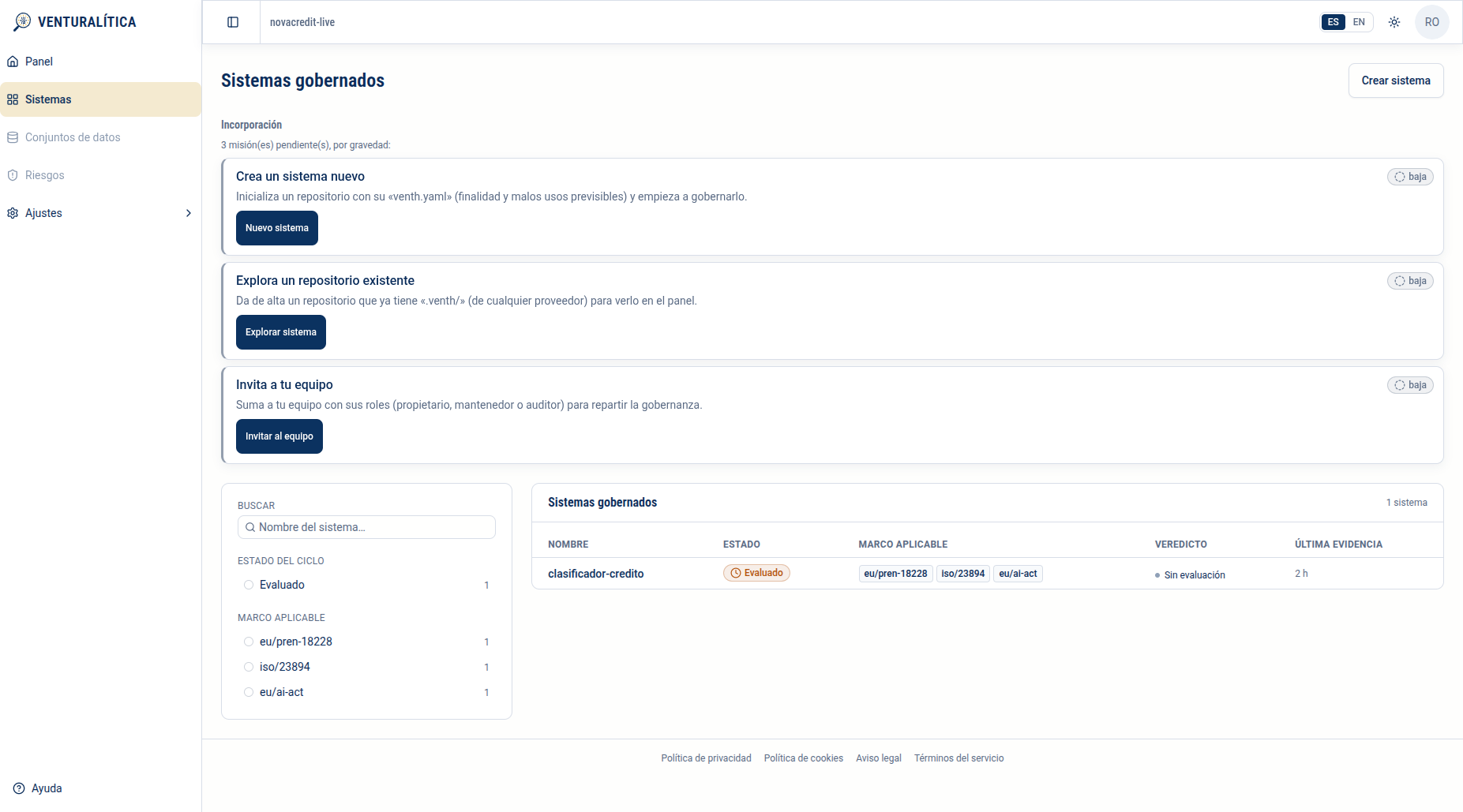
Section titled “4. The catalog: the portfolio of systems”The catalog (/[org]/systems) follows the service catalog pattern: a universal table on the right and filters on the left.
The table shows, per system: Name, lifecycle State (the badge —“Tested”, “Approved”, “Marketable”…), Applicable framework (the standards derived from the bundle: eu/pren-18228, iso/23894, eu/ai-act…), Verdict and Last evidence. Above it, an Onboarding panel with the startup missions (Create a new system · Explore an existing repository · Invite your team) that hides itself when nothing is pending.
The filters are two facets, computed over the full portfolio (each chip carries its count): Lifecycle state and Applicable framework. Filtering is AND across dimensions and OR within each, plus a name search. It answers management questions: how many systems do I have in “Tested” waiting for my approval? or which ones fall under the EU AI Act?
5. The system detail and its tabs
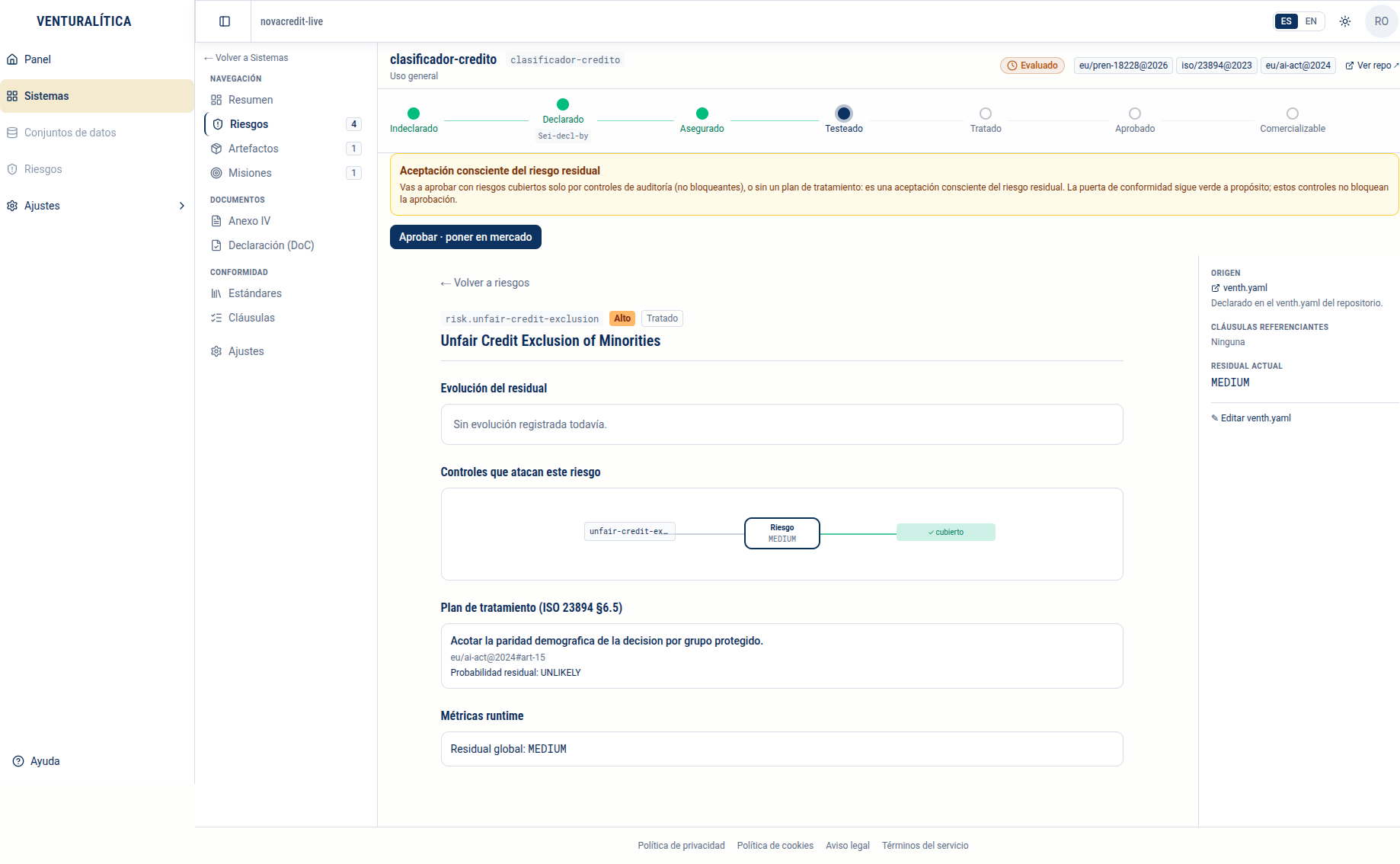
Section titled “5. The system detail and its tabs”Clicking a row leads to the system detail (/[org]/systems/[slug]), which is where James drives a concrete system. The page has three stable zones around the content.
Header. The name, the lifecycle state badge, the applicable frameworks and a “View repo” link. Right below, the lifecycle stepper (section 6) and, where appropriate, the approval actions (section 7).
Left navigation (tabs), grouped:
- Navigation: Overview · Risks (N) · Artifacts (N) · Missions (N).
- Documents: Annex IV · Declaration (DoC) · DORA Register (only if DORA applies).
- Conformance: Standards · Clauses.
- System Settings.
Overview content. The conformance Verdict (an axis distinct from the lifecycle state), the “where am I and what do I do now” state banner, the pending missions, a risk summary with its Inherent / Residual donuts and the Top-3 risks, the progress of the regulatory Documents (Annex IV %, DoC %) and the Recent activity (the git commits of the .froga/ directory).
Right sidebar: Owner, EU AI Act scope, Applicable frameworks, Repository, Evidence with the Lineage (✓ 1/1 verified) and the Actions (Download Annex IV / bundle.json).
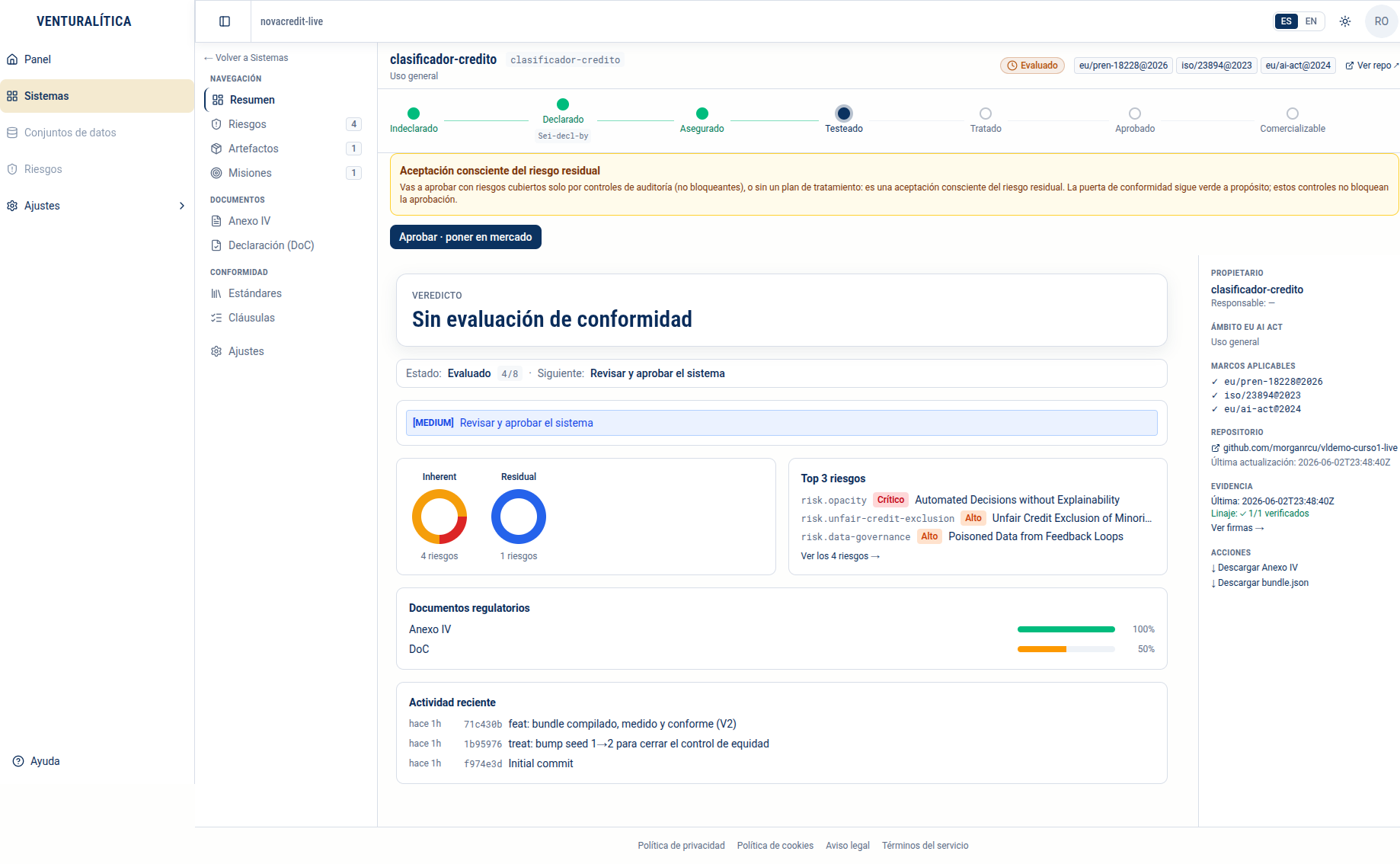
The Risks tab lists each declared risk; its card (/risks/[riskId]) shows the state (Treated/…), the control → risk-covered graph, the treatment plan (ISO 23894 §6.5), the residual, the provenance (Origin = froga.yaml) and an “Edit froga.yaml” link that opens the repo. One model limit is worth recalling: there is no “assign the risk to a person” button. Risks come from Martha’s froga.yaml; handing the risk off to whoever treats it is collaboration between roles, not a portal action.
6. The 8-state lifecycle and its stepper
Section titled “6. The 8-state lifecycle and its stepper”The heart of the cloud plane is an 8-state model covering everything pre-market (before you can place on market), aligned with the EU AI Act (Arts. 9-15 + Annex IV/DoC) and with ISO 23894. The portal draws it as a stepper in the header (with completed, current and pending nodes); the Overview’s state banner also sums it up with an ordinal fraction (for example, “4/8”: which step of eight you’re on).
| # | State (badge) | What it means | Who advances it |
|---|---|---|---|
| 1 | Undeclared | No froga.yaml; ungoverned system | Martha (commit) |
| 2 | Declared | froga.yaml declares the purpose (Annex IV §1) | Martha + the 4 sub-missions |
| 3 | Assured | Classified + standards + data gap decided | Engine (on evidence) |
| 4 | Tested | A signed bundle exists; the gate is green or red | Martha (froga run + push) |
| 5 | Treated | After a red gate, a treatment plan exists | Martha (re-trains V2) |
| 6 | Approved | Green gate + a later Froga-Approved-by trailer | James (act of direction) |
| 7 | Under periodic review | Risk review (ISO 23894 §6.6) reopened | James (reviews) |
| 8 | Marketable | Approved + all deliverables downloaded | The provider (collects the docs) |
(The visual stepper draws the 7 market nodes; “Under periodic review” is a sub-cycle of “Approved”, not a node of its own.)
stateDiagram-v2
  [*] --> Undeclared
  Undeclared --> Declared: commit froga.yaml
  Declared --> Assured: classified + standards + data gap
  Assured --> Tested: signed bundle (froga run)
  Tested --> Approved: GREEN gate + Froga-Approved-by (James)
  Tested --> Treated: RED gate + treatment plan
  Treated --> Tested: re-train V2 (new bundle)
  Approved --> UnderReview: Froga-Reviewed-by (ISO 23894 §6.6)
  UnderReview --> Approved: re-approval
  Approved --> Marketable: all deliverables downloaded
  Marketable --> [*]
What matters for James: the transitions are deterministic and derivable from the git log —there is no state database—. This is the “git closes the loop” thesis seen from the portal: the cloud plane doesn’t “remember” state, it reconstructs it from the bundle commits and the trailers (Froga-decl-by, bundle.json, Froga-treat-by, Froga-Approved-by, Froga-Delivered-by). That’s why what James sees in the portal and what Martha sees in git log are the same truth.
“I see the system in ‘Tested’, green gate, fresh evidence. Why doesn’t the portal mark it ‘Approved’ automatically? Do I have to do something?”
“You have to do exactly something, and that’s intentional. States 1-5 are advanced by the engine on evidence (bundle or treatment-plan commits). But the transition to ‘Approved’ requires an act of direction: a Froga-Approved-by trailer later than the bundle, naming the approval authority. The portal can’t invent that act —that would bypass the human control of Art. 14 and ISO/IEC 42001 §6.1.3—. When you click ‘Approve’, the cloud writes that commit in the repo and then the state derives to ‘Approved’. The stepper doesn’t advance by itself because the decision is yours, not the engine’s.”
7. Approvals: the act of direction that places on market
Section titled “7. Approvals: the act of direction that places on market”When a system is in Tested with the gate green, the actions the portal offers depend on the role:
owner(James) sees “Approve · place on market” directly. He is the approval authority: it makes no sense to ask him to “request” his own approval.maintainer(Martha) sees “Request approval”: she requests direction’s approval (writes aFroga-Approval-Requested-bytrailer), but does not approve.auditorsees no action: read-only.
If the gate is red, there’s no approval action: the mission is “Plan treatment” and the ball goes back to Martha.
The dialog. On clicking “Approve · place on market”, the portal opens the “Approve the system” dialog: it explains that “the system will be approved for market placement” and that “the act is recorded in the repository”, with a reason field. The reason is optional when there’s nothing to consciously accept, but becomes mandatory when the aggregate residual exceeds appetite or the conformance gate is red (see below). James confirms and the system moves to Approved.
The aggregate appetite above. If the system’s aggregate residual exceeds appetite (overall_residual.evaluation === "exceeds", signed by the engine), the portal shows an “Aggregate appetite above” notice before the button and turns the approval into an override with a mandatory reason: it doesn’t block (the residual is acceptable risk by risk), but it requires management to explicitly record that it accepts it. It’s the same pattern as the conformance “RED gate”. (Example: in the SDK’s loan scenario the aggregate residual exceeds appetite because risk.opacity —despite its human-oversight treatment— keeps observations in the global residual and is not bounded within its appetite; in NovaCredit the aggregate residual is within and the reason is optional. The detail is in git closes the loop.)
The conscious acceptance of residual risk. Separately, if the system has risks covered only by audit controls (non-blocking) or untreated risks that remain within their individual appetite, the portal also shows a “Conscious acceptance of residual risk” notice: the conformance gate is green on purpose, those controls don’t block, and approving is an intentional decision, not an oversight. (The Level 1 walkthrough illustrates this situation —green gate with audit-only risk—; the finer nuance —appetite, audit vs gate control, HOTL human oversight— is in git closes the loop.)
The git record. Approving doesn’t update a row in a database: it writes a commit in the repository with the Froga-Approved-by: trailer (James’s identity), later than the bundle commit. That commit is the act of direction (ISO/IEC 42001 §6.1.3), dated and attributable. The portal then derives the “Approved” state from that trailer —not the other way around—. Re-approvals (Froga-Reviewed-by + a new Froga-Approved-by) and document delivery (Froga-Delivered-by) follow the same pattern.
“The dialog says ‘the act is recorded in the repository’. As the person answering to the regulator, I need to know exactly what’s recorded and where —‘the portal remembers it’ won’t cut it.”
“What’s recorded is a commit in my repo, with the Froga-Approved-by: <your identity> trailer, dated, right after the green bundle commit. I see it in git log like any other commit —in fact it shows up in the ‘Recent activity’ tab of your own system detail—. There’s no hidden state: the portal reconstructs ‘Approved’ by reading that trailer. To an auditor, the evidence is the whole chain: the ECDSA-P256-signed bundle, its Lineage 1/1, and your approval commit on top. froga reconstruct reproduces it from git, no LLM. Your approval is as auditable as my treatment: both are commits.”
8. Roles and settings: the separation of powers
Section titled “8. Roles and settings: the separation of powers”The portal materializes three roles, and the separation between them is a compliance control:
| Role | Can | Cannot |
|---|---|---|
owner (James) | Manage the org and members, create/edit systems and connections, approve / reject / retire | — |
maintainer (Martha) | Create/edit systems and connections, request approval | Approve; manage the org |
auditor | Read everything (audit) | Any write or approval |
That only the owner approves is not a convenience restriction: it’s the act of direction that accepts the residual risk (ISO/IEC 42001 §6.1.3). That the maintainer can only request keeps the boundary between who provides the evidence (Martha) and who decides to release (James). And the read-only auditor is exactly what an external reviewer needs: to see without being able to alter.
Reject is the flip side of approve: James sends the current evidence back to Martha with a mandatory reason, recorded in the repository as a commit with the Froga-Rejected-by trailer. The system stays “rejected” until Martha pushes new evidence (which reopens the cycle on its own).
The organization Settings have four sections: Profile (org data), Members (invite, change role, resend invitation), Connections (host + token + the signer’s signing public key) and Plan (the capabilities matrix, the four-plan comparison with the standards each one licenses, and the assisted-sale upgrade CTA — see Plans & standards). Managing members and the org is owner power; connections can also be touched by the maintainer.
“A notified body wants to review the system. I have to give them access to the evidence —Annex IV, risks, lineage— but they cannot approve, edit, or touch the connections. What role do I invite them with from Settings → Members?”
“auditor: read-only across all resources. They see the systems, the risks, Annex IV and the Lineage, but no action button appears —no ‘Approve’, no ‘Create system’, no editing connections—. It’s the same role the public demo guest enters with (demo.venturalitica.ai → ‘Explore the demo’): they can browse 7 signed systems without altering any. For the external reviewer it’s exactly the least-privilege posture the audit asks for: they can check your evidence without being part of the decision chain.”
Self-check
Section titled “Self-check”Where do the portal's missions come from, and why do the four sub-missions of the «Declared» state go in a fixed order?
The missions are derived from the system’s state, not from a hand-written list: each lifecycle state has its actionable mission. The four “Declared” sub-missions —declare standards, classify (Annex III), identify risks, justify the data gap— go in that order because there’s a regulatory dependency: you can’t classify without first declaring the applicable frameworks, nor identify significant risks without knowing the high-risk category, nor scope the protected variables without the risks. The portal shows the next actionable sub-step and leaves the later ones locked with a tooltip.
You have a repo that already has signed `.froga/` evidence. Do you use «Create system» or «Explore an existing system»? Why?
“Explore an existing system”. That path ties a repo that already exposes .froga/ artifacts: the cloud reads it to validate access and registers it without writing anything. “Create system” is for starting from scratch: the cloud creates a new, empty repo and seeds an initial froga.yaml. Hitting “Create” when the evidence already exists in another repo wouldn’t tie it —it would create a separate empty system—. When Martha has already pushed the .froga/, “Explore” is the path that ties that repo.
The system is in «Tested» with a green gate and fresh evidence. Why doesn't the portal mark it «Approved» automatically?
Because the transition to “Approved” requires a human act of direction, not an engine derivation. States 1-5 are advanced by the engine on evidence (bundle or treatment-plan commits), but “Approved” needs a Froga-Approved-by trailer later than the bundle, naming the approval authority (owner). The portal can’t invent that act without bypassing the human control (ISO/IEC 42001 §6.1.3). When James clicks “Approve · place on market”, the cloud writes that commit and then the state derives to “Approved”.
James approves from the portal. Where does the proof of the approval live?
In git, as a commit. Approving doesn’t update a row in a database: it writes a commit in the repository with the Froga-Approved-by: <James's identity> trailer, dated and later than the green bundle commit. That commit is the act of direction (ISO/IEC 42001 §6.1.3); the portal then derives the “Approved” state by reading that trailer. Martha sees it in git log and in the “Recent activity” tab. There’s no hidden state: the portal and the repo tell the same truth, and froga reconstruct reproduces it from git.
What role do you give an external reviewer who must audit without being able to change anything, and why is the separation of roles compliance?
The auditor role: read-only across all resources, with no action button (no approve, no create, no editing connections). It’s the same role as the public demo guest. The separation of roles is compliance —not bureaucracy— because it keeps the boundary between who provides the evidence (maintainer, Martha), who decides to release accepting the residual risk (owner, James, ISO/IEC 42001 §6.1.3) and who only checks (auditor). Only the owner approves; the maintainer can only request.